
Create the labels
1. Print barcode labels when receiving (Purchase Orders) or producing material (capture production).
2. When capturing production scan in the barcode of the incoming material. This will create a chain that links the new barcode to the barcode you scanned.
3. Continue to do this each time the material created from a previous production step is used.
The system will now have a finished product bar code that can be traced to the original Purchase Order.
Find the origin
1) Using the global search, scan in or type the barcode number. This will give a list of all related barcodes.
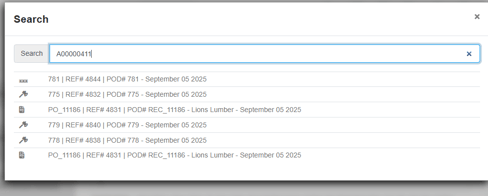
2) Click any result to view the details and history of the product.
NOTE:See related articles on the "Barcode Origin Report" and "Utilizing the bar code feature in Pallet Connect".